V1.1.0 - UECopilot Changelog
V1.1.0 — Skill System
Release Date: 2026-06-02
Update Address
Due to the file review mechanism for third-party applications in the UE5 Marketplace causing slow iteration, users who wish to continue updating can use the manual compressed package mode in UECopilot's local terminal. See Terminal Update for details.
Release Summary
This update introduces the Skill System to UECopilot, allowing users to define professional behavior guidelines for AI through Markdown skill files. The model will automatically follow the predefined knowledge and rules during conversations.
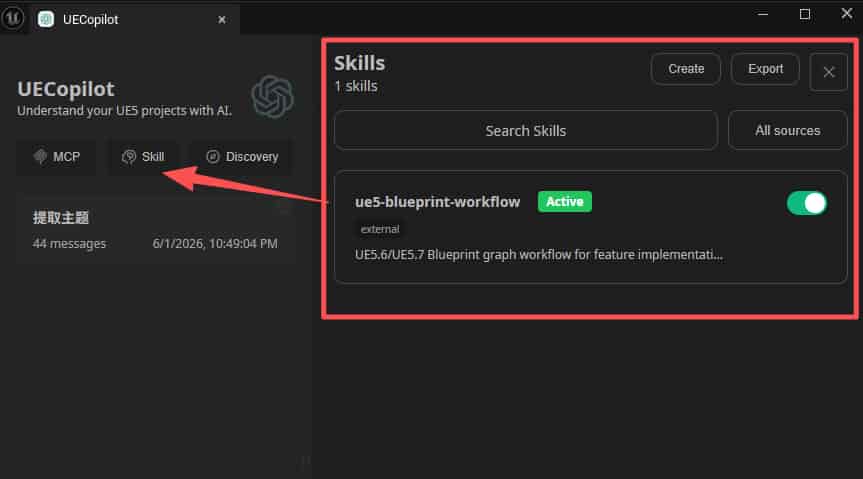
New Features
Skill Injection
- Enabled skills are automatically injected into the conversation's System Prompt — no additional AI configuration required
- Supported models: GPT / Claude / Gemini and other mainstream models (excluding O1 / O3 / O4-mini)
Built-in Skills (1)
- ue5-blueprint-workflow — UE5 Blueprint graph workflow for functionality implementation, input events, node connections, and graph validation
Skill Management
- New
/skillsmanagement page to view, enable, and disable all skills - Support for importing custom skills by pasting SKILL.md content from clipboard
- New Skills entry in the sidebar; active skill count displayed in the chat input toolbar
How to Use
- Go to the Skills page and toggle the skills you need
- To add a custom skill, click "Create New Skill" and paste SKILL.md content
- Return to the chat — the AI will automatically follow the enabled skill rules
- Use the sidebar or the input toolbar indicator to quickly return to the Skills page
Notes
- Built-in skills cannot be deleted, but can be disabled
- When adding or modifying built-in skills, remember to update the
public/skills.jsonmanifest file, otherwise the skills will not load
Developer Reference: Adding a New Built-in Skill
To add a new built-in skill, follow these two steps:
1. Register the skill in public/skills.json
id: Unique skill identifier, kebab-case recommendedpath: Points to the Markdown file in thepublic/skills/directory
2. Create the corresponding Markdown skill file in public/skills/
Once the skill file is loaded, refresh the page and the new skill will appear in the Skills management page.